Disclosure: Some links in this article are affiliate links. We may earn a commission at no extra cost to you. Our recommendations are based on hands-on testing, not sponsorship deals.
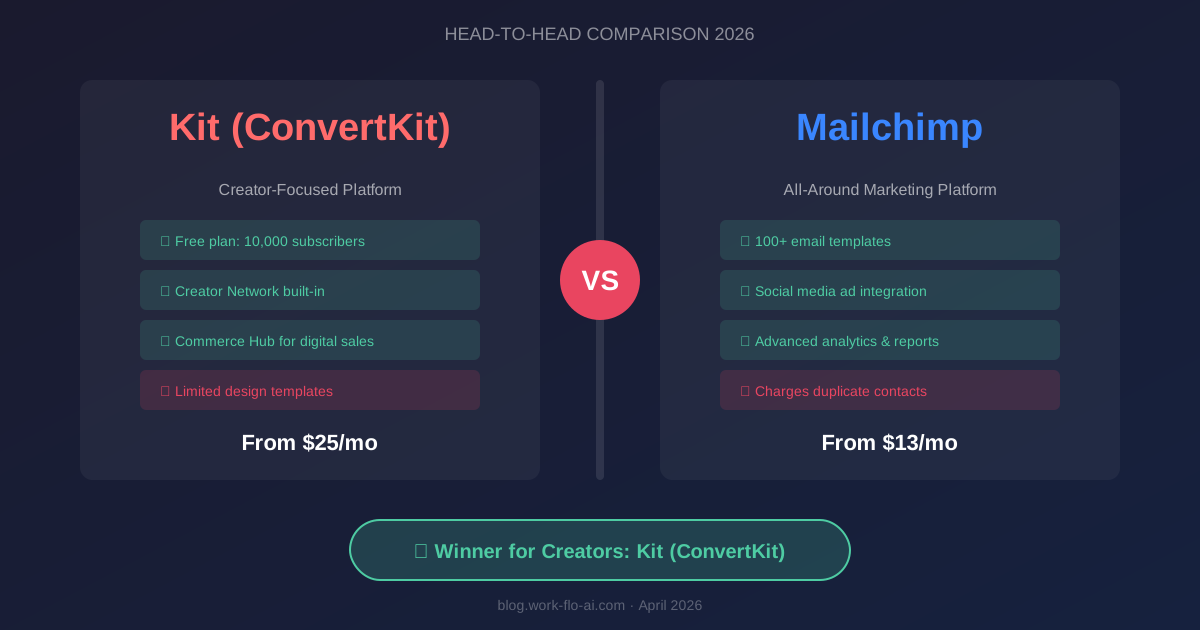
If you’re a content creator, blogger, YouTuber, or solopreneur looking for an email marketing tool, two names dominate the conversation: Kit (formerly ConvertKit) and Mailchimp.
They’re both popular. They’re both capable. But they’re built on fundamentally different philosophies — and choosing the wrong one can cost you time, money, and engagement.
Mailchimp is the biggest name in email marketing with 13+ million users. Kit was purpose-built for creators by Nathan Barry, himself a blogger and author, and now serves 600,000+ creators.
Our team tested both platforms extensively — building sequences, designing landing pages, running automations, and measuring deliverability — specifically from the creator lens. Here’s what we found.
Quick Verdict: For most creators, Kit wins. Its subscriber-centric model, clean simplicity, built-in commerce tools, and Creator Network make it the superior choice for people who build audiences around content. Mailchimp is better if you need broad marketing with social media ads, sophisticated design templates, and CRM-like insights. Skip to full verdict →
Exploring more options? Check our 7 Best Email Marketing Platforms for Small Business or our Complete Email Marketing Buyer’s Guide.
Head-to-Head Comparison Table
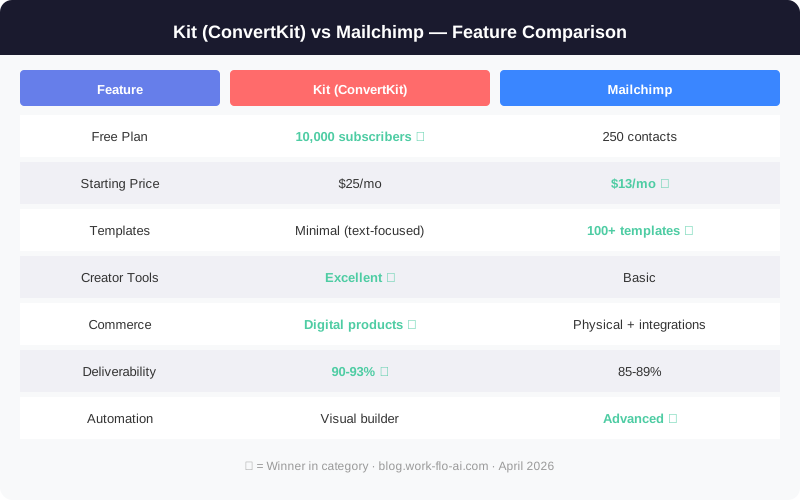
| Feature | Kit | Mailchimp |
|---|---|---|
| Starting Price | $33/mo (Creator, 1K subs) | $13/mo (Essentials, 500 contacts) |
| Free Plan | Up to 10,000 subscribers | 250 contacts |
| Data Model | Subscriber-centric (no duplicates) | List-based (duplicates possible) |
| Email Design | Minimal, text-focused | 100+ visual templates |
| Automation | Visual builder + rules | Customer Journeys |
| Landing Pages | Unlimited (all plans incl. free) | Limited on free plan |
| Commerce | Digital products, subs, tips (3.5% + 30¢) | Basic product sales |
| Creator Tools | Creator Network, Paid Recommendations | Social posting, ads |
| A/B Testing | Subject lines (2 on Creator, 5 on Pro) | Subject, content, send time |
| Deliverability | ~90-93% | ~85-90% |
| Best For | Creators, bloggers, solopreneurs | Broad marketing, e-commerce |
The Fundamental Difference: Creator-First vs. Everything-for-Everyone
Before diving into features, understand the architectural difference — it affects everything.
Mailchimp uses a list-based model. Subscribers can exist on multiple lists, and you’re charged for each instance. Someone on three lists = three contacts billed.
Kit uses a subscriber-centric model. Each person exists once in your account, regardless of how many forms they’ve filled out. You never pay for duplicates. Period.
For creators running multiple lead magnets and opt-in forms, this difference alone can save 15-30% on monthly costs.
Pricing: The True Cost of Each Platform
Kit Pricing (Annual Billing)
| Plan | 1,000 Subs | 5,000 Subs | 10,000 Subs | 25,000 Subs |
|---|---|---|---|---|
| Newsletter (Free) | $0 | $0 | $0 | — |
| Creator | $33/mo | $79/mo | $119/mo | $179/mo |
| Creator Pro | $66/mo | $111/mo | $167/mo | $279/mo |
Free plan: up to 10,000 subs, unlimited landing pages/forms, broadcasts only. No automation on free plan.
Mailchimp Pricing
| Plan | 500 Contacts | 2,500 Contacts | 10,000 Contacts | 25,000 Contacts |
|---|---|---|---|---|
| Free | $0 (250 contacts) | — | — | — |
| Essentials | $13/mo | $45/mo | $100/mo | $230/mo |
| Standard | $20/mo | $60/mo | $135/mo | $260/mo |
| Premium | $350/mo | $350/mo | $350/mo | $350/mo |
Real Cost Analysis for Creators
At face value, Mailchimp looks cheaper. But factor in the duplicate contact issue and free plan differences:
The free plan gap is massive. Kit gives you up to 10,000 subscribers for $0/month. Mailchimp gives you 250 contacts. For creators just starting out, Kit’s free plan alone could save you $100+/month as your list grows.
At scale with duplicates:
- Scenario: 5,000 unique subscribers, 3 lead magnets, 20% on multiple lists
- Mailchimp actual contacts: ~6,000 (including duplicates) → Standard: ~$75/mo
- Kit actual subscribers: 5,000 (no duplicates) → Creator: $79/mo
Almost identical — and Kit gives you commerce tools included.
Kit also includes features Mailchimp charges extra for:
- Landing pages (unlimited on free plan vs. limited on Mailchimp free)
- Commerce tools (3.5% + 30¢ vs. Mailchimp’s e-commerce add-on)
- Creator Network (free audience growth — Mailchimp has no equivalent)
- SparkLoop referral program (free on Pro, normally $99/mo)
Email Design & Templates
Mailchimp: Design Powerhouse
Mailchimp offers 100+ email templates with a sophisticated drag-and-drop editor. Perfect for visual brands — retail, fashion, food, lifestyle. You can create stunning, brand-consistent emails with custom layouts, image galleries, social buttons, and AI-powered content suggestions.
Kit: Intentional Simplicity
Kit offers about 15 clean templates and a writing-focused editor that feels like composing in Google Docs. This is a deliberate design choice backed by data.
Why text-based emails often outperform designed ones for creators:
- Higher inbox delivery (less likely to trigger spam filters)
- Faster load times on mobile (60%+ of emails are read on mobile)
- Feels personal — like a message from a friend
- Higher click-through rates (readers focus on content, not design)
Winner: Mailchimp for visual design. Kit for creator-optimized engagement.
Automation
Kit’s Automation
Kit’s visual automation builder uses a tag-and-trigger system that’s intuitive for creators. The Creator plan unlocks unlimited automations with visual workflows, tag-based subscriber journeys, and sequence-based drip campaigns. The free plan allows 1 sequence.
Typical creator workflows Kit handles beautifully:
- Welcome sequences based on which freebie someone downloaded
- Course launch funnels with segmented messaging
- Post-purchase onboarding for digital products
- Re-engagement campaigns for inactive subscribers
Mailchimp’s Customer Journeys
Mailchimp’s Customer Journeys are capable but limited on lower-tier plans. The free plan gets only basic single-step automations (up to 4 steps per flow). Full automation requires Standard ($20/mo) or higher.
Winner: Kit for creator workflows and simpler setup. Mailchimp for multi-channel automation on Standard+ plans.
Commerce & Monetization
This is where Kit pulls dramatically ahead.
Kit Commerce Hub
- Digital products — ebooks, courses, templates, presets
- Paid subscriptions — recurring newsletter revenue
- Tips/donations — let supporters pay what they want
- Transaction fees: 3.5% + 30¢ on all plans (inclusive of credit card processing)
- Built-in checkout pages — no separate cart tool needed
Kit Creator Network & Paid Recommendations
- Creator Network — cross-promote with other creators for organic growth
- Paid Recommendations — earn money recommending other newsletters
- SparkLoop integration (free on Pro, worth $99/mo) — newsletter referral program
Creators report gaining 50-500+ subscribers/month through the network.
Mailchimp Commerce
Mailchimp supports e-commerce through integrations (Shopify, WooCommerce) and basic product listing pages. Functional for physical products but lacks native digital product selling.
Winner: Kit by a huge margin for creator monetization.
Deliverability
| Metric | Kit | Mailchimp |
|---|---|---|
| Average Inbox Rate | ~90-93% | ~85-90% |
| Spam Rate | ~2-4% | ~4-8% |
| Gmail Inbox Rate | ~92-95% | ~87-91% |
| DKIM/SPF | ✅ | ✅ |
| Dedicated IP | Creator Pro (10K+ subs) | Essentials (add-on) |
| Deliverability Reporting | Creator Pro only | All paid plans |
Kit consistently outperforms Mailchimp in deliverability tests. Contributing factors: text-focused emails, stricter list hygiene, and a creator-focused audience with higher engagement rates.
Winner: Kit, meaningfully.
Ease of Use
Kit: Signup to first broadcast in 10-15 minutes. Interface is clean, navigation obvious. 5/5 for ease of use.
Mailchimp: Interface has grown complex with features spanning email, social, ads, websites, CRM, and more. Basic email is simple; Customer Journeys and audience management take time. 3.5/5 for ease of use.
Winner: Kit.
Customer Support
| Channel | Kit | Mailchimp |
|---|---|---|
| Live Chat | 24/7 (Creator+ plans) | Essentials+ (limited hours) |
| All paid plans (priority for Pro) | All paid plans | |
| Phone | No | Premium only ($350/mo) |
| Migration | Free (Creator Pro) | Self-serve |
| Support Quality | Excellent — team understands creators | Variable — large team, inconsistent |
Winner: Kit for quality. Mailchimp for phone availability (at $350/mo).
Final Verdict
Choose Kit If You Are:
- ✅ A blogger, podcaster, YouTuber, or course creator
- ✅ Selling digital products (courses, ebooks, templates)
- ✅ Looking for the simplest, fastest setup
- ✅ Wanting to monetize your newsletter (subscriptions, sponsors, tips)
- ✅ Seeking organic list growth via Creator Network
- ✅ Prioritizing deliverability over design
- ✅ Starting out and want 10,000 subscribers free
👉 Start Kit Free — Up to 10,000 Subscribers, No Credit Card →
Choose Mailchimp If You Are:
- ✅ Running an e-commerce store (physical products)
- ✅ Needing visually designed, brand-heavy emails
- ✅ Wanting social media posting and ad management in your email tool
- ✅ A team that needs multi-user access with role permissions
- ✅ Looking for broad CRM-like audience insights and predictive analytics
- ✅ Already in the Intuit ecosystem (QuickBooks, etc.)
👉 Try Mailchimp Free — Start With 250 Contacts →
The Creator’s Bottom Line
For the typical content creator — someone building an audience, selling knowledge products, and growing a personal brand — Kit is the better choice in nearly every dimension: simplicity, deliverability, monetization, cost-efficiency, and free plan generosity.
If you’re already on Mailchimp and considering a switch, Kit offers free migration support on Creator Pro plans. The switch is easier than you think.
For deeper comparisons, see our GetResponse vs Kit review or our detailed ActiveCampaign Review.
👉 Start Building Your Creator Email List With Kit — Free for Up to 10,000 Subscribers →
Frequently Asked Questions
Can I migrate from Mailchimp to Kit easily?
Yes. Kit offers free concierge migration for Creator Pro subscribers and import tools for self-service migration on other plans. Export your Mailchimp lists as CSV and import directly. Tags transfer, but automations and templates need rebuilding. Typically takes 1-3 days.
Is Kit worth the higher price over Mailchimp?
For creators, yes. When you account for Mailchimp’s duplicate contact charges, limited automation on lower tiers, and the value of Kit’s commerce tools and Creator Network, the effective cost difference shrinks or disappears. Kit’s free plan supporting 10,000 subscribers vs Mailchimp’s 250 makes Kit cheaper for most starting creators.
Which is better for a newsletter-only business?
Kit. Its text-focused emails, subscriber-centric model, built-in paid subscription feature, and Paid Recommendations make it the ideal newsletter platform.
Can I use Mailchimp to sell digital products?
Mailchimp has basic product listing and checkout through integrations, but it’s primarily designed for physical e-commerce. For digital products, Kit’s Commerce Hub is purpose-built and far more capable.
Does Mailchimp have anything like Kit’s Creator Network?
No. As of 2026, Mailchimp has no built-in cross-promotion or audience-sharing feature. This remains unique to Kit and is one of its most compelling competitive advantages.
Last updated: April 2026. Pricing verified against official websites.