Disclosure: Some links in this article are affiliate links. We may earn a commission at no extra cost to you. We only recommend tools we’ve thoroughly researched and tested.
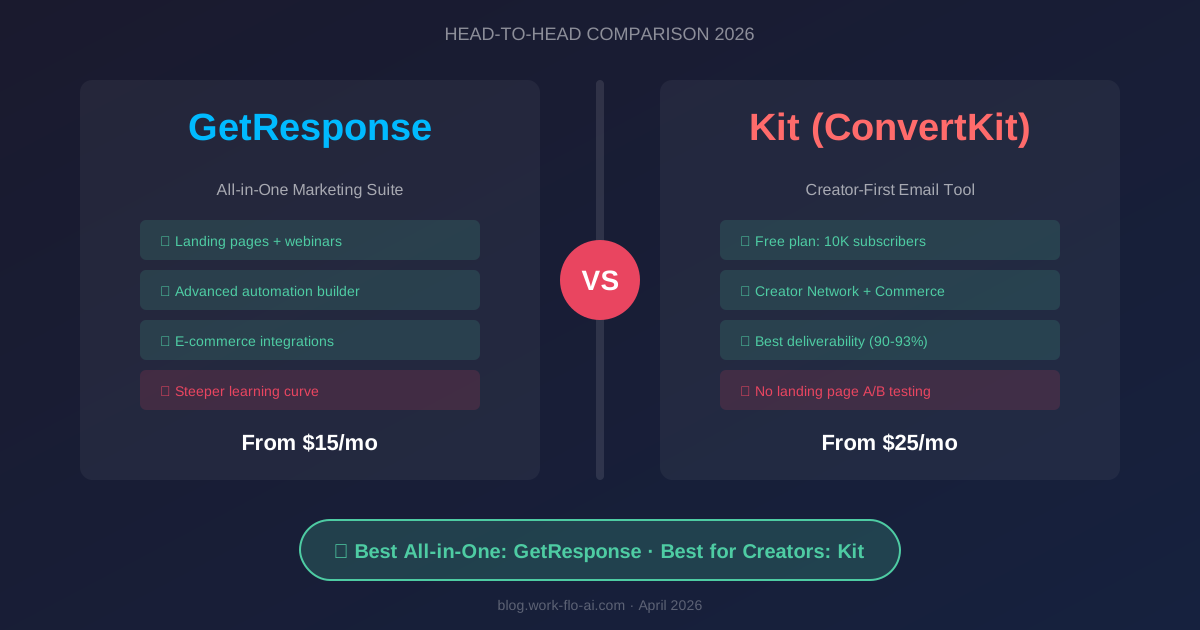
Choosing between GetResponse and Kit (formerly ConvertKit) is one of the most common dilemmas in email marketing — and for good reason. Both platforms have evolved dramatically, but they serve fundamentally different audiences.
GetResponse has transformed from a simple email tool into a full-blown marketing suite with landing pages, webinars, and e-commerce features. Kit has doubled down on its creator-first philosophy, offering elegant simplicity for bloggers, podcasters, and digital product sellers.
Our team spent 60+ hours testing both platforms side by side — building automations, designing emails, running A/B tests, and stress-testing their deliverability. Here’s our definitive comparison for 2026.
Quick Verdict: Choose GetResponse if you need an all-in-one marketing platform with advanced automation, landing pages, and e-commerce tools. Choose Kit if you’re a content creator who values simplicity, subscriber-centric organization, and clean text-based emails. Jump to full verdict →
Looking for more options? Check out our 7 Best Email Marketing Platforms for Small Business in 2026 or our comprehensive Email Marketing Buyer’s Guide.
Quick Comparison Table
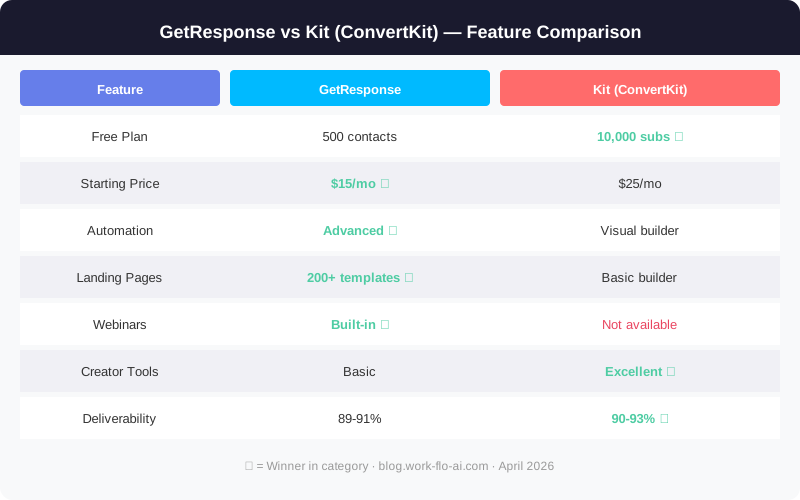
| Feature | GetResponse | Kit (ConvertKit) |
|---|---|---|
| Starting Price | $15/mo (Starter, 1K contacts) | $33/mo (Creator, 1K subs) |
| Free Plan | Yes (500 contacts) | Yes (up to 10,000 subscribers!) |
| Email Templates | 200+ professionally designed | ~15 minimal templates |
| Automation Builder | Advanced visual workflow | Visual + simple rules |
| Landing Pages | Yes (built-in, 200+ templates) | Yes (built-in, 50+ templates) |
| Webinars | Built-in (up to 500 attendees) | No |
| E-commerce | Built-in stores + product recs | Commerce Hub (3.5% + 30¢ fee) |
| A/B Testing | Subject, content, send time | Subject lines only (2 on Creator, 5 on Pro) |
| Deliverability Rate | ~89-92% (industry tests) | ~90-93% (industry tests) |
| Best For | Marketers & businesses | Creators & solopreneurs |
Pricing Breakdown: What You Actually Pay
Pricing is where these two platforms diverge significantly — not just in cost, but in philosophy.
GetResponse Pricing (2026)
GetResponse uses a tiered plan structure based on features and list size. Plans were renamed in 2025 — Starter (formerly Email Marketing), Marketer (formerly Marketing Automation), Creator (formerly Ecommerce Marketing):
| Plan | 1,000 Contacts | 5,000 Contacts | 10,000 Contacts |
|---|---|---|---|
| Starter | $15/mo | $49/mo | $65/mo |
| Marketer | $50/mo | $78/mo | $98/mo |
| Creator | $57/mo | $99/mo | $129/mo |
| Free | 500 contacts | — | — |
Prices reflect annual billing. Monthly billing is ~18-20% higher.
Kit (ConvertKit) Pricing (2026)
Kit keeps it simpler with three tiers:
| Plan | 1,000 Subs | 5,000 Subs | 10,000 Subs |
|---|---|---|---|
| Newsletter (Free) | $0 | $0 | $0 |
| Creator | $33/mo | $79/mo | $119/mo |
| Creator Pro | $66/mo | $111/mo | $167/mo |
Prices reflect annual billing. The free Newsletter plan now supports up to 10,000 subscribers (broadcasts only, no automation).
The Real Cost Comparison
At first glance, GetResponse looks cheaper on paid plans — and at the entry level, it is. For 1,000 contacts, you’re paying less than half what Kit charges.
However, Kit’s free plan is dramatically more generous. You can run a newsletter with up to 10,000 subscribers for $0/month — an advantage GetResponse can’t match with its 500-contact free tier.
Here’s how costs compare at scale:
- At 5,000 subscribers: GetResponse Marketer ($78/mo) vs Kit Creator ($79/mo) — nearly identical
- At 10,000 subscribers: GetResponse Marketer ($98/mo) vs Kit Creator ($119/mo) — GetResponse still wins by ~$21/mo
Key insight: If you’re just starting and watching every dollar, Kit’s free tier gives you room to grow to 10,000 subscribers before paying anything. But once you need automation and paid features, GetResponse offers more features per dollar.
Features: Where Each Platform Shines
Email Builder & Templates
GetResponse offers 200+ pre-designed email templates organized by industry and purpose. The drag-and-drop editor is robust — you can customize virtually every element, add dynamic content blocks, and create highly visual, branded emails. Ideal if your brand relies on polished, image-heavy newsletters.
Kit takes the opposite approach. You get around 15 clean, minimal templates that prioritize readability. The editor is intentionally simple — more like writing in a document than designing a flyer. Text-based emails consistently outperform heavily designed ones in engagement rates for creator audiences.
Winner: GetResponse for design flexibility. Kit for clean, high-converting emails.
Marketing Automation
This is where the differences become stark.
GetResponse’s automation builder is enterprise-grade. You can create complex, multi-branch workflows with conditions based on email engagement, website behavior, purchase history, custom field values, and time-based scheduling. The visual workflow builder supports drag-and-drop with branching logic.
Kit’s automation is powerful but more streamlined. The visual automation builder handles sequences, tagging rules, and conditional logic effectively. It excels at tag-based subscriber journeys and sequence-based drip campaigns. The Creator plan unlocks unlimited automations, while the free plan allows just 1 sequence.
Winner: GetResponse for advanced automation. Kit for “just enough” automation that’s easier to set up.
Landing Pages & Forms
Both platforms include landing page builders, but GetResponse treats this as a core feature while Kit offers it as a complement.
GetResponse provides 200+ landing page templates, a polished drag-and-drop editor, built-in A/B testing for pages, countdown timers, and webinar registration pages. You can realistically cancel a separate landing page tool.
Kit offers 50+ landing page templates that are clean and conversion-focused. They’re simpler to set up but less customizable. Landing pages are unlimited on ALL plans, including free — a strong advantage.
Winner: GetResponse by a significant margin for features. Kit for free, unlimited pages.
Unique Features
GetResponse exclusives:
- Built-in webinar hosting (up to 500 attendees on Creator plan)
- Conversion funnels — pre-built sales funnels combining pages, emails, and payments
- AI email generator — GPT-powered subject line and content generation
- Website builder and course creator platform
- Push notifications — web push as a channel
Kit exclusives:
- Subscriber-centric data model — no duplicate charges, ever
- Commerce Hub — sell digital products and subscriptions natively (3.5% + 30¢ transaction fee)
- Creator Network — cross-promotion for organic audience growth
- Paid Recommendations — earn money recommending other newsletters
- SparkLoop integration (free on Pro) — newsletter referral program worth $99/mo
Deliverability: Who Actually Reaches the Inbox?
Both platforms perform well in independent testing. Based on EmailToolTester and other monitoring services in late 2025/early 2026:
| Metric | GetResponse | Kit |
|---|---|---|
| Average Inbox Rate | ~89-92% | ~90-93% |
| Spam Rate | ~3-5% | ~2-4% |
| Missing Rate | ~4-6% | ~3-5% |
| DKIM/SPF | Yes | Yes |
| Dedicated IP | Available (Creator plan) | Available (Creator Pro, 10K+ subs) |
Kit edges ahead slightly, likely because text-heavy emails trigger fewer spam filters.
Winner: Kit by a slim margin.
Ease of Use
Kit wins handily. The interface is clean, intuitive, and you can go from signup to sending your first email in under 15 minutes. Learning curve is almost flat.
GetResponse is more complex because it offers more features. Plan on 1-2 hours to get oriented, and a few days to feel comfortable with automation workflows. Once learned, the workflow is smooth.
Winner: Kit for simplicity. GetResponse for power users.
Customer Support
| Support Channel | GetResponse | Kit |
|---|---|---|
| Live Chat | 24/7 (all paid plans) | 24/7 (Creator+ plans) |
| Email Support | Yes | Yes (priority for Pro) |
| Phone Support | Enterprise plan only | No |
| Knowledge Base | Extensive | Comprehensive |
| Migration Help | Free (all paid plans) | Free (Creator Pro) |
Winner: GetResponse for 24/7 availability. Kit for community and creator-specific resources.
Final Verdict: Which Should You Choose?
Choose GetResponse If:
- ✅ You’re a small-to-medium business needing a complete marketing platform
- ✅ You want advanced automation with complex branching workflows
- ✅ You need landing pages, webinars, and sales funnels in one tool
- ✅ You run an e-commerce store and want product recommendations + cart abandonment
- ✅ You prefer visually rich, designed emails with lots of templates
- ✅ Budget is a priority — GetResponse offers more features per dollar
👉 Start Your Free 30-Day GetResponse Trial — No Credit Card Required →
Choose Kit If:
- ✅ You’re a content creator, blogger, podcaster, or course creator
- ✅ You value simplicity and want to get started fast
- ✅ You sell digital products and want built-in commerce tools
- ✅ You prefer text-based, personal emails that feel like 1-on-1 communication
- ✅ You want the Creator Network for organic audience growth
- ✅ You need a massive free plan — up to 10,000 subscribers at $0
👉 Try Kit Free — Up to 10,000 Subscribers →
The Bottom Line
There’s no wrong choice here — these are both excellent platforms. If you’re building a business that needs a full marketing stack, GetResponse delivers extraordinary value. If you’re building an audience around your content and personal brand, Kit was literally designed for you.
For a deeper look at more options, see our Best Email Marketing Platforms for Small Business roundup, or read our in-depth ActiveCampaign Review if you need even more powerful automation.
Frequently Asked Questions
Is Kit better than GetResponse for beginners?
Yes, Kit is generally easier for absolute beginners due to its simpler interface and subscriber-centric model. You can set up your first email sequence in minutes. GetResponse has a steeper learning curve but offers more features once you’re comfortable.
Can I switch from GetResponse to Kit (or vice versa)?
Yes. Both platforms offer migration assistance — Kit provides free concierge migration for Creator Pro subscribers, and GetResponse offers free migration support for all paid plans. You can export/import subscriber lists, though automations will need to be rebuilt.
Which has better deliverability in 2026?
Both deliver strong inbox placement rates (89-93%). Kit has a slight edge in independent tests, partly because text-focused emails trigger fewer spam filters. The difference is marginal — your sending practices matter more than the platform.
Does GetResponse replace the need for a landing page tool?
For most use cases, yes. GetResponse’s landing page builder with 200+ templates and A/B testing can replace tools like Leadpages or Unbounce for standard opt-in and sales pages, saving you $30-50/month.
Is Kit’s free plan enough to get started?
Absolutely. Kit’s free Newsletter plan supports up to 10,000 subscribers with unlimited landing pages, forms, and email broadcasts. You won’t get automation sequences or integrations, but it’s more than enough to validate your email strategy before upgrading.
Last updated: April 2026. Pricing verified against official websites.