Disclosure: This guide contains affiliate links. If you purchase through our links, we earn a commission at no additional cost to you. Our recommendations are based on genuine evaluation, not sponsorship.
With 400+ email marketing platforms on the market, choosing the right one feels less like a decision and more like a coin toss. Every tool claims to be “the best,” every comparison site contradicts the last, and pricing pages are designed to confuse.
This guide cuts through the noise. Our team has tested 20+ email marketing platforms over 500+ hours and distilled everything into a practical framework you can apply to any tool.
By the end of this guide, you’ll know exactly what to look for, what to avoid, and how to evaluate any email marketing platform with confidence.
Already know what you need? Jump to our 7 Best Email Marketing Platforms for Small Business for specific recommendations, or check our detailed comparisons: GetResponse vs Kit | Kit vs Mailchimp | ActiveCampaign Review
Step 1: Define Your Email Marketing Goals
Before comparing features, answer this: What do you need email marketing to do for your business?
| Primary Goal | Tool Category | Recommended |
|---|---|---|
| Send newsletters to an audience | Simple email platform | Kit Free, MailerLite Free |
| Nurture leads and close sales | Automation-focused platform | ActiveCampaign, GetResponse |
| Sell digital products directly | Creator commerce platform | Kit, MailerLite |
| Manage e-commerce journeys | E-commerce email platform | GetResponse, Brevo |
| Send transactional + marketing emails | Hybrid platform | Brevo |
| Full marketing suite (email + CRM + landing pages) | All-in-one platform | GetResponse, ActiveCampaign |
Pro tip: Most businesses overestimate their initial needs. Start with the simplest tool that covers your core use case. Migration is easier than people think.
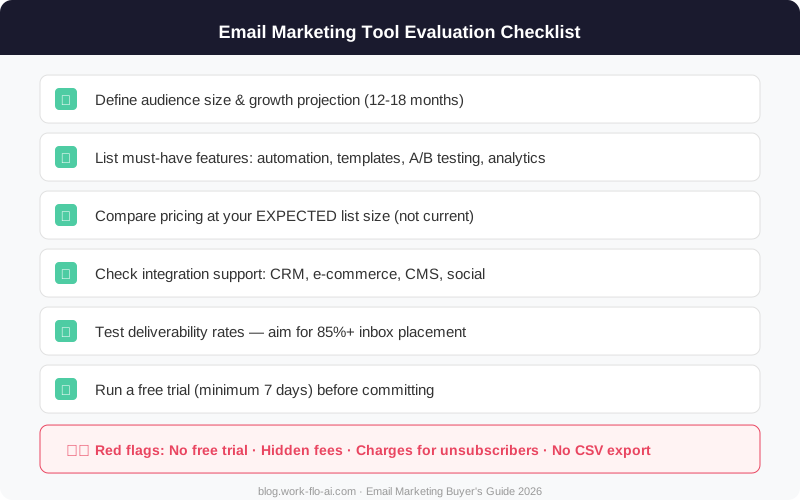
Step 2: The 8-Point Evaluation Checklist
Use this checklist when evaluating any platform. Score each item 1-5 for your needs.
✅ 1. Contact/Pricing Model
The single most important factor people overlook:
Contact-based pricing (most common):
- Pay based on contacts in your database
- ⚠️ Watch for platforms that count duplicates or charge for unsubscribed contacts
- ✅ Choose platforms counting unique contacts only (Kit, ActiveCampaign)
Email-based pricing:
- Pay based on emails sent per month, regardless of contacts
- Best if you have a large list but send infrequently
- Brevo uses this model
Pricing Red Flags 🚩
- Charges for unsubscribed/bounced contacts
- Duplicate contact billing across lists
- Dramatic price jumps between tiers
- Hidden fees for basic automation
- “Unlimited” plans with unclear fair-use policies
✅ 2. Email Builder & Design
For visual brands (e-commerce, retail): Prioritize templates, drag-and-drop design → Mailchimp, GetResponse
For personal brands (creators, coaches): Prioritize clean text editor, fast creation → Kit, MailerLite
For B2B: Prioritize professional layouts, personalization → ActiveCampaign, GetResponse
Non-negotiables:
- ✅ Mobile-responsive templates (60%+ of emails read on mobile)
- ✅ Preview/test before sending
- ✅ Personalization fields
- ✅ Save your own templates
✅ 3. Automation Capabilities
| Level | What You Need | Recommended |
|---|---|---|
| Level 1 — Basic | Welcome emails, autoresponders | MailerLite, Kit, AWeber |
| Level 1-2 — Intermediate | Visual workflows, behavioral triggers | GetResponse, Kit Creator |
| Level 2-3 — Advanced | Lead scoring, multi-channel, CRM integration | ActiveCampaign, GetResponse Marketer |
| Level 3 — Enterprise | Predictive AI, attribution modeling | ActiveCampaign Pro, HubSpot |
✅ 4. Deliverability
Current deliverability rankings (2025-2026 average):
| Platform | Inbox Rate |
|---|---|
| Kit | ~90-93% |
| ActiveCampaign | ~90-92% |
| GetResponse | ~89-92% |
| MailerLite | ~89-91% |
| AWeber | ~88-90% |
| Brevo | ~85-90% |
| Mailchimp | ~85-90% |
Your deliverability depends on sending practices, list hygiene, and content. Platform choice matters but isn’t the only factor.
✅ 5. Integrations
Essential for most businesses:
- Website/CMS (WordPress, Squarespace, Webflow)
- Payment processor (Stripe, PayPal)
- Zapier or Make (for connecting everything else)
For e-commerce: Shopify, WooCommerce, cart abandonment tracking
For creators: Course platforms (Teachable, Kajabi), membership tools (Patreon)
For B2B: CRM (Salesforce, Pipedrive), calendar (Calendly, Cal.com)
✅ 6. Reporting & Analytics
- Basic (every platform): Open rate, click rate, subscriber growth
- Intermediate: Click maps, engagement scoring, A/B results
- Advanced: Revenue attribution, predictive analytics, custom dashboards
✅ 7. Ease of Use
| Comfort Level | Best Options |
|---|---|
| “I just want it to work” | Kit, MailerLite |
| “I can learn new tools” | GetResponse, Mailchimp |
| “I enjoy mastering systems” | ActiveCampaign |
Quick test: During a free trial, can you create and send an email within 30 minutes? If not, the tool may be too complex.
✅ 8. Customer Support
| Platform | Live Chat | Phone | Migration Help | |
|---|---|---|---|---|
| GetResponse | 24/7 (all paid) | ✅ | Enterprise only | Free |
| Kit | 24/7 (Creator+) | ✅ | ❌ | Free (Pro) |
| ActiveCampaign | Business hours | ✅ | ❌ | Free |
| Mailchimp | Limited hours (Essentials+) | ✅ | Premium only ($350/mo) | Self-serve |
| MailerLite | 24/7 (all paid) | ✅ | ❌ | Free |
| AWeber | 24/7 (all plans) | ✅ | ✅ (all plans) | Free |
| Brevo | Business hours (Standard+) | ✅ | Professional+ | Self-serve |
Step 3: Common Red Flags to Avoid
🚩 Pricing Red Flags
- No clear pricing page — expect enterprise costs
- Price jumps that don’t scale linearly (e.g., Mailchimp $20/mo for 500 → $350/mo for Premium)
- Charges for unsubscribed contacts — paying for people who said “no”
- Essential features locked behind premium tiers — basic automation should be mid-tier
- Free plan limits keep shrinking — Mailchimp’s free plan went from 2,000 → 500 → 250 contacts
🚩 Feature Red Flags
- No DKIM/SPF authentication — security baseline
- No mobile preview — unacceptable in 2026
- No segmentation on lower plans — email without segmentation is spam
- No API — limits future integration possibilities
🚩 Business Red Flags
- Recent acquisition — watch for pricing changes and feature removals
- Declining reviews — check G2, Capterra, TrustRadius trends
- No clear data export — you should ALWAYS be able to export as CSV
- Support quality declining — check recent reviews specifically about support
Step 4: The Trial Process
Don’t just sign up and click around. Use this structured checklist:
Week 1: Setup & Basics
- Import a test list (100-500 contacts)
- Set up DKIM/SPF authentication
- Create and send a test email — measure time from login to send
- Build a landing page with an opt-in form
- Set up a 3-email welcome automation
- Check mobile rendering
Week 2: Advanced & Support
- Build a branching automation with logic
- Run an A/B test
- Test integrations with your key tools
- Submit a support ticket — measure response time and quality
- Review analytics/reporting
- Explore knowledge base and learning resources
Final Evaluation
- Can you teach this tool to a team member?
- Does the interface feel efficient or frustrating?
- Any deal-breaker limitations?
- Does pricing make sense for 12-month projected growth?
Step 5: Pricing Strategy — How to Save Money
Best Free Plans in 2026
| Platform | Free Contacts/Subs | Key Limits |
|---|---|---|
| Kit | 10,000 subs | Broadcasts only, no automation |
| MailerLite | 500 subs | 12,000 emails/mo, limited automation |
| Brevo | Unlimited contacts | 300 emails/day, Brevo branding |
| Mailchimp | 250 contacts | 500 emails/mo, minimal features, Mailchimp branding |
Note: AWeber no longer offers a free plan — it’s now a 14-day free trial only.
Annual vs Monthly Billing
Annual billing saves 15-30% but locks you in. Our recommendation:
- Month 1-3: Pay monthly while you evaluate
- Month 4+: Switch to annual once you’re confident
Negotiate (Yes, Really)
- Startup discounts — ActiveCampaign, HubSpot offer startup programs
- Non-profit discounts — typically 15-30% off
- Competitor switch offers — mention you’re migrating from a competitor
Avoid Overpaying
- Clean your list quarterly — remove bounced and inactive contacts
- Don’t pay for features you don’t use — downgrade if unnecessary
- Avoid keeping duplicate contacts on list-based platforms
- Switch to annual billing after your trial period
- Review pricing annually — competitors may offer better deals
Our Recommendations by Business Type
For Creators (Bloggers, YouTubers, Podcasters)
Start with: Kit Free (up to 10,000 subscribers) Upgrade to: Kit Creator ($33/mo) when you need automation Why: Subscriber-centric model, Commerce Hub, Creator Network, best deliverability Read more: Kit vs Mailchimp for Creators
For Small Businesses (Services, Local, Consulting)
Start with: MailerLite Free (500 subscribers) Upgrade to: GetResponse Starter ($15/mo) for more features Why: Best value per dollar, solid features, easy to use Read more: Best Email Marketing Platforms for Small Business
For E-commerce
Start with: GetResponse Starter or Brevo Starter Upgrade to: GetResponse Marketer or ActiveCampaign Plus Why: Cart abandonment, product recommendations, revenue tracking Read more: GetResponse vs Kit
For B2B / Lead-Heavy Businesses
Start with: ActiveCampaign Starter ($29/mo) Upgrade to: ActiveCampaign Plus when you need CRM pipelines and lead scoring Why: Most powerful automation, built-in CRM, deep segmentation Read more: ActiveCampaign Review 2026
For Startups on a Tight Budget
Start with: Kit Free (10,000 subs) or MailerLite Free (500 subs) Upgrade to: MailerLite Growing Business ($10/mo) — cheapest solid paid plan Why: Maximum features at minimum cost
The Decision Matrix
Rate each platform 1-5, multiply by weight, sum totals:
| Criterion | Weight | Notes |
|---|---|---|
| Pricing/Value | 25% | Total cost including hidden fees |
| Core Features | 20% | Does it do what you need? |
| Automation | 15% | Match to your complexity needs |
| Ease of Use | 15% | Can your team actually use it? |
| Deliverability | 10% | Independent test results |
| Integrations | 10% | Covers your critical tools? |
| Support | 5% | Available when you need it? |
👉 See our scored recommendations in the Best Email Marketing Platforms guide →
Frequently Asked Questions
How often should I reevaluate my email marketing tool?
Review annually. The landscape changes rapidly — platforms add features, change pricing, and get acquired. Set a calendar reminder each year. Migration is typically straightforward (CSV export/import).
What’s the minimum I need to start email marketing?
Three things: (1) a platform with a free plan, (2) one opt-in form or landing page, and (3) a welcome email. Start simple, learn what works, add complexity as you grow.
Should I choose based on current list size or projected growth?
Project 12-18 months ahead. Choose a platform whose pricing stays reasonable at your expected list size. If you have 500 subscribers now but expect 5,000 in a year, verify pricing at that level.
Is it hard to switch email marketing platforms?
Easier than most think. Every reputable platform supports CSV export. Most offer migration help. The main effort is rebuilding automations and templates — subscriber data transfers cleanly.
Do I need separate tools for transactional and marketing emails?
Not necessarily — Brevo handles both. But many businesses prefer separation: if marketing triggers a spam flag, you don’t want it affecting order confirmations. Common setup: dedicated transactional service (Postmark, Amazon SES) + marketing platform.
How we evaluated: We signed up for free trials of each platform, built real campaigns, tested automation workflows, measured deliverability, and contacted support to evaluate quality. Last updated: April 2026.